“It used to be that the writers read their own work. But he had changed that. Many a bad paper was praised because its author was a dramatic reader. And many a possible literary treasure was lost to the world because its creator read it in a dull monotone. The Prof solved the whole thing by reading all the themes aloud. That way each one got an even break in the reading.” – Betty Smith, Joy in the Morning
Replace “a dull monotone” with “a terrible website,” and voila! The current issue. How many wonderful businesses fail because the creators appear to have built their website in Geocities? Less dramatically, how many ticket sales does a wonderful company such as, (for example) the BSO lose to a poor website design?
What’s Wrong with the BSO’s Website?
I love Wait, Wait… Don’t Tell Me, NPR’s “oddly informative news quiz.” The moment I heard they were coming to Tanglewood, a mere two hours from me, I picked up my phone to buy tickets.
I’m used to ticket sales being a fairly terrible mobile experience, so after a mildly frustrating few minutes of searching the BSO site, I calmly and patiently waited (by which I mean, jumped up and down in anxious excitement) to get home to my laptop.
All of this to say, I was highly motivated to find and purchase my tickets. It would take a lot to make me give up.
It would take, for example…
- A confusing, multi-button approach to selecting seats
- A complex sign-in form disrupting my purchase
- A flow dumping me (post sign-in) back at the start, with no clear way to find my shopping cart
- No way to delete an individual item from the shopping cart (in case, in all the confusion, I had now selected twice as many tickets as I had intended)
- The “delete” button emptying my entire shopping cart, and forcing me to begin the entire process again
A Confusing, Multi-Button Approach
I had a very simple goal in mind: purchase 3 lawn seats. After using a very detailed filter-search system (good work guys! Is it too much to ask for a calendar view too?), I zeroed in on the date, clicked on it, and came to “Select Your Seats.”
…there was no option for lawn seats.
Wait, what?! I checked again. There are always lawn seats – but, it appears I could only find them under the tab “Best Available Seats,” instead of “Select Your Seats.” Silly me. I should have known that the best content strategy is always to force the user to adapt to the website’s choice of language!
Regardless, I typed “3,” and the screen updated to show me that I could choose between “lawn” and “standard” seats. I selected “lawn,” clicked “Get Seats,” and waited for the screen to update. And waited. And waited. But the only change on the screen was on the lower right side, where a new pop up was asking me to confirm that I wanted 3 standard lawn seats. (I should note that selecting the dropdown “standard” reveals that there are no other choices available.)
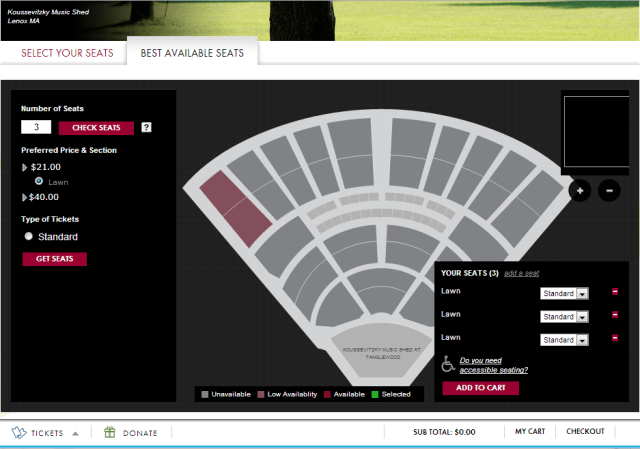
First click on “Get Seats.” But that won’t add them to your cart!
Now, finally, I could add my 3 tickets to my cart, and check out.
The Sign-In Form
It saddens me that Sign-In forms disrupting purchases are so common. Truly, at this point Amazon is the only site I trust to ask me to sign in and then continue flawlessly to my shopping cart. So I’ll skip over the 15 minutes of frustration as I searched for my shopping cart, eventually gave up, and went back through the filter-and-search process, back through the seat selection, and back through “Get Seats” and then “Add to Cart.”
The Delete Button
Of course, now that I had repeated the process, my shopping cart showed me 6 tickets, not 3. Obviously, I had to remove 3 of the tickets.
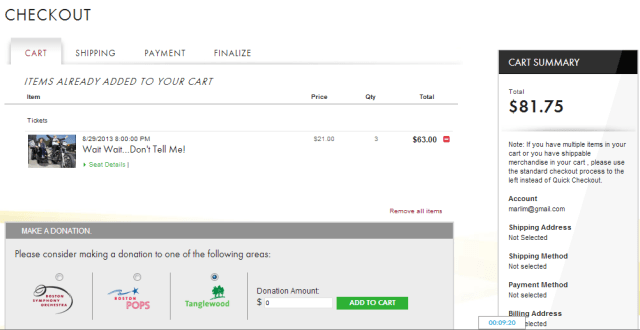
Where can I delete a single ticket?
Avoiding the “Remove all items” link, I instead opted for the red “minus” button beside my total. And that, as you may have guessed, deleted everything from my shopping cart. Time to start again.
What Can We Learn?
I love the BSO. I love Tanglewood, and summer nights sitting on the lawn listening to music. I can’t wait for Wait, Wait… Don’t Tell Me this August. I just wish that this treasure wasn’t lost in a dull monotone of terrible UX elements.
Save yourself. Learn from the BSO’s mistakes:
- You need users to sign in. That doesn’t mean they want to, so make the sign-in process painless, and reassure users that they’ll be able to continue toward their goals.
- Allow users to continue toward their goals, after signing in.
- Consider the primary goals of your users. Can they easily access their shopping cart? Their recently viewed items? Their account, or saved payment types, if applicable?
- Never forget the value of iconography. Find out what users associate with certain icons (e.g. the minus symbol on the BSO’s shopping cart page). Use icons for good, not evil.
- Test the edge cases. They may not be as rare as you think. For example, I doubt anyone building out the BSO’s ticketing page thought “what if someone wants to delete only 3 of the 6 tickets selected?” and yet, that’s not such an edge case, given the shopping cart issues!

 Marli Mesibov: Content Strategist & Writer